Login
To login to ecLabNote, you go to https://www.eclabnote.com/labbook/ and select Login. After you enter username and password you will see your latest experiments to the right and the menu (see Figure 1) to the left.
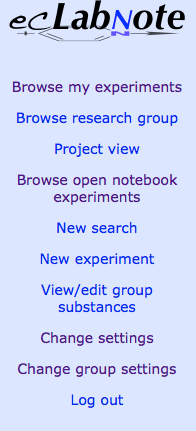 Figure 1: Menu at login
Settings
In the menu You will also find entries to change settings. “Change Settings” will take you to the panel in Figure 2. Here you can change your username, full name, and password. You can also change your preferred chemical editor and the view style.
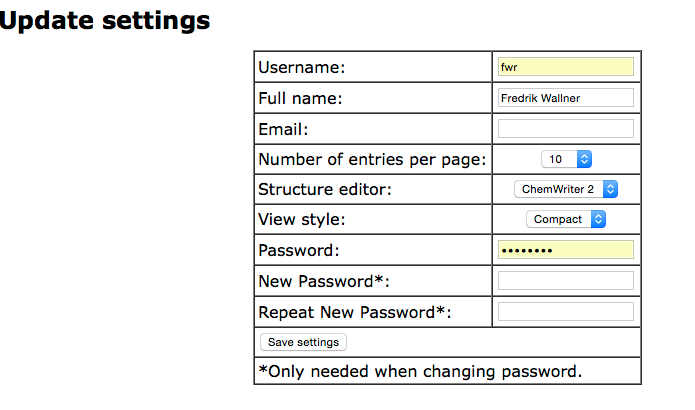 Figure 2: Settings panel
Group settings
If you are a group admin, you will find the entry “Change Group Settings” which will allow you to add new users to the group and to disable users.
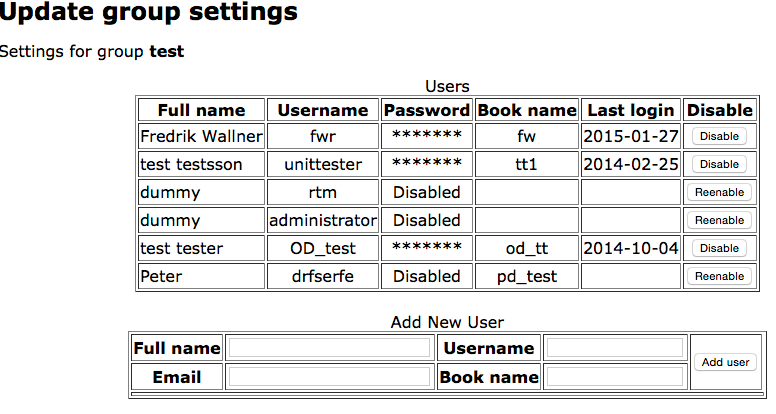 Figure 3: Group settings
To add a new user, enter the full name, username, email, and book name and press “Add user”. The user list will then be updated with a new entry, where the generated password is shown. Please note this password, since it can’t be found after you leave or reload the page. If a user forgets his or her password, you can temporarily disable and then immidiately reenable the account to create a new password. The book name is prefixed to all the users experiments and cannot be changed once the user is created. Common names are user initials or a research group abbreviation combined with the user initials.